Lab: Natural Number Calculator View
We recommend that you work on this lab with a classmate. Any work you and your partner develop during the lab can be shared in your project submission. However, after the lab is concluded, each student is required to work on the remainder of the project on their own.
Objective
In this lab you will design and implement a GUI for a NaturalNumber
calculator that may be used in your Natural Number Calculator
project.
Setup
Follow these steps to set up a project for this lab.
- Create a new Eclipse project by copying
ProjectTemplate. Name the new projectNaturalNumberCalculatorView. - Open the
srcfolder of this project and then open(default package). As a starting point you can use any of the Java files. Rename itNNCalcViewLaband delete the other files from the project. - Follow the link to
NNCalcViewLab.java, select all the code on that page and copy it to the clipboard; then open theNNCalcViewLab.javafile in Eclipse and paste the code to replace the file contents. Save your file.
Method
-
First carefully look through the
NNCalcViewLab.java. The skeleton provides the following:- Declarations of widgets and constants that you will need for the calculator GUI;
- A constructor with detailed comments for various steps needed to build the GUI for the calculator;
- A simple event handler (
actionPerformed) that displays a dialog identifying the button pressed; - A
mainmethod that creates and displays the view and can be used to test your design.
-
Complete the constructor to build a GUI for the calculator. This is the suggested layout for the GUI:
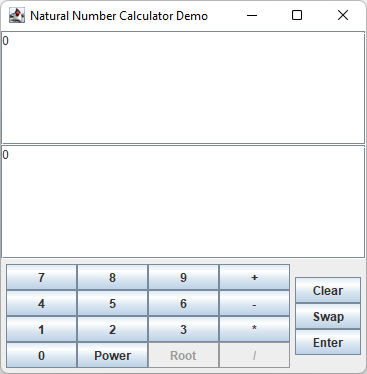
-
Run the program and modify your interface until it looks "just right".
Calculator Demo
A demo version of an executable solution to the calculator project is provided for you to experiment with and possibly to emulate. The user interface in your solution is not required to match the one in the demo, but it may be easier to try to reproduce the GUI of the demo at least as a starting point.
To run the demo, you need to import the program into Eclipse. First you
need to download the project archive, natural-number-calculator.zip,
to your computer. Click on this download
link and save the file somewhere
on your hard drive where you can easily find it. Make sure that you do
not expand this archive. If your browser automatically expands
downloaded zip archives, that's OK too. Just pay attention to the
special instructions in the following few steps. You may want to make a
note of where you saved it.
Import your new project in Eclipse by following these steps:
- From the File menu select Import....
- In the new window, expand General and select Existing Projects into Workspace. Click Next.
- Click on the radio button next to Select archive file and then click the Browse... button. (If the archive was expanded when you downloaded the file to your own computer, click on Select root directory... instead.)
- In the file selection window, find the
natural-number-calculator.zipfile and select it. (If your browser expanded the archive, find thenatural-number-calculatordirectory instead.) Click OK. - Click Finish.
To run the program, find the RunCalculator.java file in the src
folder in the project and run it as usual as a Java Application.
Additional Activities
- If you complete your GUI design with time to spare, you should get
started with the Natural Number Calculator
project.
Review the skeleton class
NNCalcView1provided with the project and complete the constructor to build the GUI for the calculator. Note that there are a few additional elements inNNCalcView1.javathat were not included in this lab.