Lab: XMLTree Model
Objectives
Even though this lab does not involve any programming, it does have an
important and fundamental objective, that is, to ensure you understand
completely what the value of an XMLTree object looks like. Please make
sure you answer each of the questions in this lab carefully and
thoughtfully. Discuss them with the classmate sitting next to you and
write down all the answers so that an instructor can check them out. If
you encounter any problems or you have any doubts about any of the
questions, please make sure you ask an instructor for help.
The Problem
The XMLTree family of components provides convenient functionality to
read and process XML documents. Understanding the model of an
XMLTree is essential to being able to use these components. This lab
activity will take you step-by-step through the concepts needed to
understand the model. In the next lab you will learn and practice how to
manipulate XMLTree s with the methods provided by the XMLTree
component.
Method
Carefully consider and answer the questions below.
What's a Tree?
Given the tree of colors below, answer the following questions.
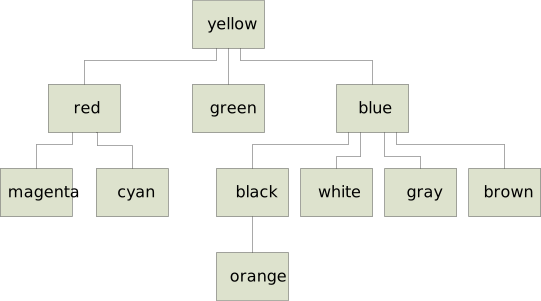
- What's the root of the tree?
- What are the leaves of the tree?
- What are the children of the node
blue? - What is the parent of the node
cyan? - What nodes are on the path from the root to the node
orange? - What is the size of the tree?
- What is the height of the tree?
What's XML?
Consider the following XML document and answer the questions below.
 1. <WebServiceResponse>
 2.  <status>OK</status>
 3.  <result>
 4.   <type>Building</type>
 5.   <name>Dreese Labs</name>
 6.   <location>
 7.    <lat>40.002382</lat>
 8.    <lng>-83.015958</lng>
 9.   </location>
10.  </result>
11.  <result>
12.   <message>CSE Department</message>
13.  </result>
14. </WebServiceResponse>
- What are the tags in this XML document?
- What are the text strings in this XML document?
- What are the attributes for each tag in this XML document?
- Draw a tree that captures the structure (nesting) of this XML document.
Now consider the following XML document and answer the questions below.
 1. <album label="Sony">
 2.   <title>Gershwin: Rhapsody In Blue / An American In Paris</title>
 3.   <composer>George Gershwin</composer>
 4.   <conductor>Leonard Bernstein</conductor>
 5.   <released date="Oct 25, 1990"></released>
 6.   <tracks>
 7.     <track number="1" duration="16:29">Rhapsody in Blue</track>
 8.     <track number="2" duration="18:30">An American in Paris</track>
 9.   </tracks>
10. </album>
- What tags have attributes?
- For each tag with attributes, list the attribute name and the corresponding attribute value.
What's an XMLTree?
Here is a picture of an XMLTree representing the second XML document
above.
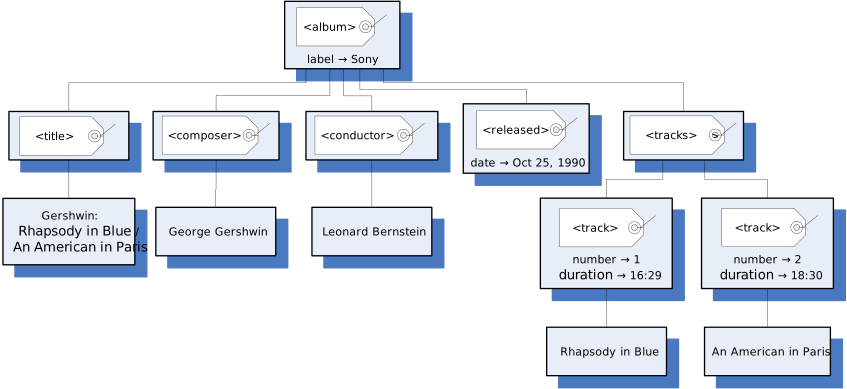
- Match each node in the tree with a line in the XML document above
(draw a tree with the same layout as the given
XMLTreewhere each node has the line number corresponding to that node). - Draw the node(s) in the tree that correspond to line 3 in the XML document.
- Draw the node(s) in the tree that correspond to line 8 in the XML document.
- What line(s) in the XML document correspond to the
<conductor>node? - What line(s) in the XML document correspond to the
<tracks>node? - What's the only tag node that is a leaf in the
XMLTree?
Paths in XMLTree
Recall that in an XMLTree the children of a given node are numbered
with increasing integer values (indices, positions) starting at 0 for
the first child, 1 for the second child, etc. For instance, in the
XMLTree above, <title> is child 0 of <album> , <composer> is
child 1, <conductor> is child 2, and so on.
- What is child 3 of
<album>? - What is child 0 of
<tracks>? - What is child 1 of
<composer>?
A path in an XMLTree can be identified in two different ways by either
listing the labels of the nodes on the path or by listing the index of
each node (except the root) as a child of its parent. So, for instance,
a path from the root to the George Gershwin node can be identified
either by listing the nodes on the path: ( <album> , <composer> ,
George Gershwin ), or by listing the root followed by the indices
corresponding to the nodes on the path: ( <album> , 1, 0) because
<composer> is child 1 of <album> and George Gershwin is child 0 of
<composer> .
Consider the text node An American in Paris in the XML tree above.
- Draw the nodes on a path from the root of the tree to this node.
- For each of the nodes on this path (except for the root), what is the integer index of the node as a child of its parent?
Adding Attributes
Suppose we modified the XML document above so that both the <composer>
and the <conductor> tags have an attribute born whose value is the
date of birth, i.e.,
 3.  <composer born="Sep 26, 1898">George Gershwin</composer>
 4.  <conductor born="Aug 25, 1918">Leonard Bernstein</conductor>
- Draw the nodes in the
XMLTreethat would have to be modified to include this new information.
Replacing Attribute with Child
Now suppose we wanted to change the <released> tag in the XML document
above so that the date is not an attribute of the tag but instead a
text child of the tag node.
- Rewrite line 5 in the XML document above to show the result of this change.
- Draw the nodes in the
XMLTreethat would have to be modified to reflect this change in the XML document.
Drawing an XMLTree
Consider the following XML document:
 1. <weather>
 2.   <location>
 3.     <city>Columbus</city>
 4.     <state>OH</state>
 5.   </location>
 6.   <current text="Light Rain" high="75" low="54" date="8 Sep 2012"></current>
 6.   <forecast text="Sunny" high="79" low="52" date="9 Sep 2012"></forecast>
 8. </weather>
- Draw the complete
XMLTreecorresponding to this document. - A city is logically inside a state. So, change the structure of the
XML document to put the
<city>element inside the<state>element. What essentially arbitrary decision did you make when doing this? Redraw the part of theXMLTreethat is changed by this modification, taking care to match the document with respect to the decision just mentioned.
Let's Explore!
For this part of the lab, you will use a program that allows the user to
load XML documents into XMLTree objects and display their values. You
can run this program by importing it into Eclipse. First you need to
download the project archive,
xmltree-viewer.zip, to your computer by
clicking on the link and saving the file somewhere on your hard drive
where you can easily find it. Make sure that you do not expand this
archive. If your browser automatically expands downloaded zip archives,
that's OK too. Just pay attention to the special instructions in the
following few steps. You may want to make a note of where you saved it.
Import your new project in Eclipse by following these steps:
- From the File menu select Import....
- In the new window, expand General and select Existing Projects into Workspace. Click Next.
- Click on the radio button next to Select archive file and then click the Browse... button. (If the archive was expanded when you downloaded the file to your own computer, click on Select root directory... instead.)
- In the file selection window, find the
xmltree-viewer.zipfile and select it. (If your browser expanded the archive, find thexmltree-viewerdirectory instead.) Click OK. - Click Finish.
To run the program, find the RunViewer.java file in the src folder
in the project and run it as usual as a Java Application.
Once you start the program, you can enter the URL of an XML document or
a path on the local drive for an XML file in the XML Input field and
click Go to load an XML document, open a new window, and display the
value of the corresponding XMLTree . There are several ways to enter
your input in the field: you can type the URL or file path, or you can
use the Browse... button to locate a file on the local drive, or you
can select one of the entries you have used before (if any) in the
drop-down menu.
Copy and paste (or type) the entry
https://cse22x1.engineering.osu.edu/2221/web-sw1/extras/instructions/xmltree-model/album.xml
in the address bar and click Go. This XML document contains the XML
example we used earlier. Expand all the nodes and see how the tree
displayed in the viewer window matches with
the
XMLTree picture above.

In particular, observe the different icons used to identify tags and
text nodes; also note how attributes and their values are displayed
between [ ]. Make sure you do not continue until you can match each
element in
the
XMLTree above to each element of the
XMLTree displayed in the viewer.
Now let's open a page downloaded from an old (and now discontinued)
Yahoo's weather forecast XML service. Copy and paste (or type) the entry
https://cse22x1.engineering.osu.edu/2221/web-sw1/extras/instructions/xmltree-model/columbus-weather.xml
in the address bar and click Go.
Answer the following questions by exploring the XMLTree displayed.
- What is the root node?
- How many attributes does the root tag have?
- What is the value of the
yahoo:langattribute of the root tag? - How many children does the root node have?
- How many children does the
<results>node have? - How many children does the
<channel>node have? - What is the range of indices of the children of the
<channel>node? - What is the index of the
<yweather:location>child of the<channel>node? - What are the names and values of the attributes of the
<yweather:location>tag? - Under the
<item>child of the<channel>node, find the<geo:lat>and<geo:long>tags. What are the latitude and longitude of your chosen location? - For both the latitude and longitude text nodes give the list of indices of the path from the root to the corresponding text node.
- Under the
<item>child of the<channel>node, find the node with the forecast for January 31 2017. What is the label of this node? - What is the index of this node as a child of the
<item>node? - What are the names and values of the attributes of this node (i.e., what is the weather forecast for that day)?
- What is the height of the tree?
- List the nodes on a longest path from the root to a leaf (i.e., a path of length equal to the height of the tree).
- For each of the nodes on this path (except for the root), what is the integer index of the node as a child of its parent?
Additional Activities
- Use the
XMLTreeViewerprogram to explore other XML documents (e.g., from your favorite RSS feeds) to get a better understanding of XML and theXMLTreemodel.